
Xenon on macOSBeta
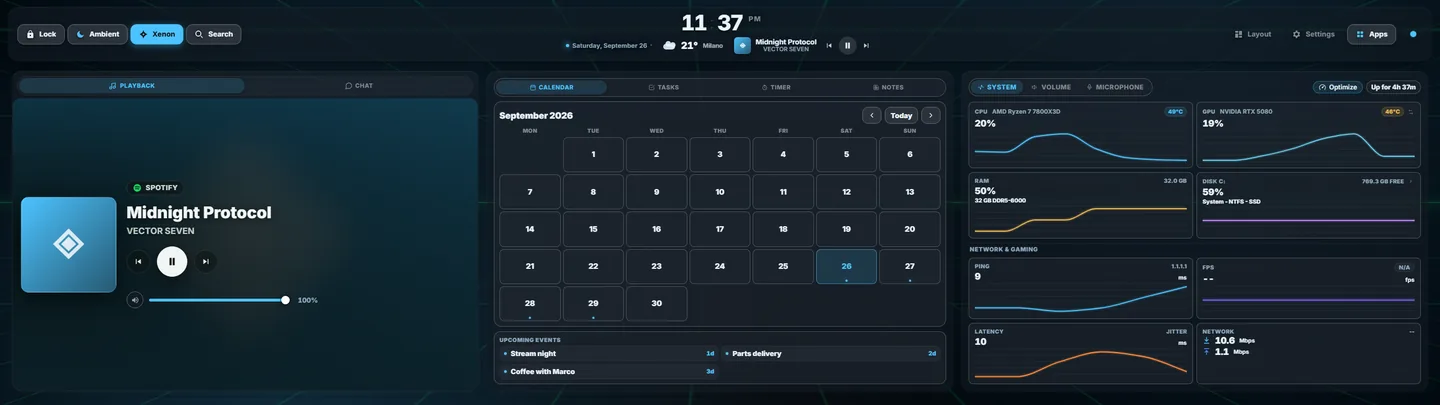
Xenon is a free touch dashboard for the screen next to your computer. On a Mac it runs the same dashboard as on Windows. This page lists what works there today, what does not, and how to install and remove it.
Last updated: 27 September 2026
Who it is for
This page is for a Mac owner with a second screen to spare:
- A CORSAIR Xeneon Edge. Xenon was first designed around its 2560×720 shape.
- A spare monitor. The Xenon app opens on the screen you pick.
- A tablet or a phone. It shows the same dashboard in its browser over your Wi-Fi, with nothing to install on it. Phone and tablet access is in beta too. See pairing a phone or tablet.
The widgets, the catalog, the themes and the integrations are the same as on Windows. What differs is the part that reads and controls the Mac itself, and the table below lists it row by row.
macOS support is in beta. It is covered by unit tests but has had far less real-world use than the Windows build.
Download and requirements
- macOS 11 or later, on Apple Silicon or Intel. The .dmg is a universal build, so there is one download for both.
- Node.js 18.15 or later. If it is missing and Homebrew is installed, the setup installs it with Homebrew. Otherwise it stops and asks you to install it from nodejs.org.
The rest is optional. Each tool adds one thing, and the installer names the ones you do not have:
brew install vladkens/tap/macmonfor temperature and GPU load, only if the Xenon Helper cannot read them.brew install switchaudio-osxfor switching the output device.brew install ffmpegfor voice input and spoken replies.
First launch
Opening an app that is not notarized
Xenon is not notarized by Apple yet. Notarization needs a paid Apple Developer membership, which this project does not have, so the first time you open Xenon macOS says it cannot check it.
- Open the .dmg and drag Xenon to Applications, then open it.
- On macOS 15 and later, when macOS refuses, open System Settings, then Privacy & Security.
- Scroll to the bottom and click Open Anyway next to Xenon.
On macOS 11 to 14 you can instead right-click the app, choose Open, then Open again. Apple removed that shortcut in macOS 15. Either way, it is once per version.
Setting up the dashboard engine
A .dmg cannot run an installer, so the first launch does it. Xenon finds no dashboard behind it and opens a Terminal window you can read and stop. In that window it:
- downloads the latest release and its signed checksum list;
- checks the download against the project's signing key before extracting anything;
- installs into
~/Library/Application Support/Xenon; - adds the Xenon Helper, a small companion for the app switcher, temperatures and search, and the bridge that reads what is playing;
- registers a login item, so Xenon opens when you log in.
When it finishes, the installer closes and reopens the app, and the dashboard appears. It is also at http://127.0.0.1:3030/ in any browser on the Mac.
The dashboard engine runs as a child of the Xenon app. That is why one Full Disk Access grant to Xenon covers it, instead of a grant to Node.js that every other script on the Mac would share.
Updates work as on Windows: the new version is downloaded and verified first, and the previous one is put back if the new one does not start.
Prefer no app window? Download the source code zip from the release, extract it and double-click INSTALL.command. The dashboard is the same, but without the app the folders macOS protects stay out of reach.
What works on a Mac
Anything your Mac cannot do is hidden, not offered and then failed: a Deck key that cannot work does not appear in the editor, and a tile with no data source says so.
| Area | On a Mac |
|---|---|
| Dashboard, tiles, themes, catalog, widget SDK | Works, the same as on Windows. |
| Xenon app, starts at login, updates itself | Works. |
| CPU, RAM, disks, network | Works. |
| CPU and GPU temperature, GPU load | Works through the Xenon Helper, with no administrator password. Falls back to macmon, then shows "--". |
| Fan speeds | Not available on a Mac. |
| System volume, microphone mute | Works. |
| Switching the output device | Works with switchaudio-osx installed. |
| Per-app volume mixer | Not available. The mixer shows devices only. |
| Now playing and media keys | Works, through the bridge the installer adds. |
| Open apps, app switcher, game mode | Works, through the Xenon Helper. |
| Deck keys: open an app, file or site, run a script, lock | Works. |
| Deck keys that send a keyboard shortcut | Works once Xenon Helper is allowed under Accessibility. |
| Global search hotkey | Works, through the Xenon Helper. |
| File search, disk map and cleanup | Works, through the Xenon Helper. Search matches file names. Needs Full Disk Access to include your home folder. |
| Typing text and moving windows from the dashboard | Not available on a Mac. |
| Xenon AI chat and actions, cloud and local | Works. |
| Voice input and the AI's screen vision | Works. Voice needs ffmpeg. |
| "Hey Xenon" wake word | Works with ffmpeg and the free local Whisper, which Settings, Xenon AI installs through Homebrew. |
| Network lighting: WLED, Hue, Nanoleaf, OpenRGB | Works. |
| CORSAIR iCUE lighting | Windows only. |
| Streaming, Spotify, Discord, Home Assistant, Claude Code | Works. |
| In-game FPS counter | Not available on a Mac. |
| Desktop notifications on the dashboard | Not available. macOS gives no app a way to read another app's notifications. |
| Incoming-call card | Discord calls only. |
| Embedded browser tile | Works with Edge, Chrome, Chromium or Brave installed. |
| Phone or tablet as a second screen | Works. Phone access is in beta on every system. |
| Access away from home, push to your phone | Works once you install Tailscale yourself. |
| Virtual second screen, remote PC control | Windows only. |
If a tile is empty, run npm run doctor in the install folder. It lists what works, what your hardware does not expose and what is broken, and it changes nothing.
The Xeneon Edge on a Mac
The first time Xenon opens, it lists the screens it can see. Pick the Edge and the dashboard moves there. You can change it later in Settings, Display.
Touch works differently than on Windows. macOS has no support of its own for USB touchscreens, so apps such as Touchscreen Gestures turn each touch into a mouse click, and a long press into a right click. Xenon runs a Deck key's Hold action on a right click, so Hold works on that setup too.
Three things stay on Windows: game-safe touch, which keeps a game focused while you tap the Edge; CORSAIR iCUE lighting; and the virtual second screen.
macOS permissions
The dashboard runs without any of these. Each one switches on a specific feature.
- Full Disk Access, for Xenon. Lets search and the Disk widget see your home folder, the Trash and most of
~/Library/Caches. Without it Xenon stays out of your home folder instead of asking for Desktop, Documents and Downloads one by one, and shows one notice with a button to the right settings pane. - Accessibility, for Xenon Helper. Lets Deck keys send a keyboard shortcut to the app in front. Until you allow it, that kind of Deck key is left out of the editor. Xenon checks this permission when it starts, so quit and reopen Xenon after allowing it.
- Screen Recording. Needed when the AI takes a screenshot to see your screen. Without it the capture shows only the desktop picture.
- Microphone. Needed for voice input and the "Hey Xenon" wake word. Without it Xenon finds no microphone.
- Automation. Only if the Xenon Helper is missing: the app switcher then falls back to scripting, which macOS asks about once per application.
To give Xenon Full Disk Access:
- Open System Settings, Privacy & Security, Full Disk Access.
- Click +, choose Xenon in Applications, and check that its switch is on.
- Quit Xenon and open it again. The permission is read at launch.
Since version 4.11.3 Xenon is signed with its own certificate, which stays the same across releases, so the grant survives updates. If Xenon is listed but the permission is clearly not working, remove it with the minus button and add it again.
Uninstalling
- In Finder, choose Go, Go to Folder, and enter
~/Library/Application Support/Xenon. - Double-click
UNINSTALL.command. - It lists everything it is about to remove and waits. Type
REMOVEto go ahead.
It removes the app from Applications, the login item, the local server, your data and the install folder, then closes its own Terminal window.
To keep your settings, layouts and notes, run UNINSTALL.sh, the script it starts, from Terminal with --keep-data added:
cd "$HOME/Library/Application Support/Xenon"
./UNINSTALL.sh --keep-data
With --dry-run instead, it shows the list and changes nothing.
Dragging Xenon to the Trash removes only the app. The dashboard engine, its login item and your data stay behind; the uninstaller removes them too.
Questions
Does Xenon work on a Mac?
Yes, in beta, on macOS 11 or later. One universal .dmg runs on Apple Silicon and Intel. The dashboard, widgets and integrations are the same as on Windows; a few system features are not available.
Can I use a Xeneon Edge with a Mac?
Yes. Xenon asks which screen to use the first time it opens, and you can pick the Edge. macOS has no support of its own for USB touchscreens, so touch needs an app that turns touches into clicks. iCUE lighting and game-safe touch are Windows only.
Why does macOS say Xenon cannot be opened?
The app is not notarized by Apple yet. On macOS 15 and later, open System Settings, Privacy & Security, and click Open Anyway next to Xenon. On macOS 11 to 14, right-click the app and choose Open. It is once per version.
Which permissions does Xenon need on a Mac?
The dashboard runs without any. Full Disk Access lets search and the Disk widget see your home folder and the Trash. Accessibility lets Deck keys send keyboard shortcuts. Screen Recording and Microphone are for the AI's screen vision and voice.
How do I uninstall Xenon on a Mac?
Double-click UNINSTALL.command in ~/Library/Application Support/Xenon and type REMOVE when asked. It removes the app, the login item, the local server, your data and the install folder.
Download Xenon for Mac
Download Xenon-macOS-universal.dmg, or pick another system on the download page. To look around first, open the demo in your browser. Questions go to the Discord.