
Every Xenon widget
Xenon is a free touch dashboard for the screens next to a PC: a CORSAIR Xeneon Edge, a spare monitor, a touchscreen, or, in beta, a phone or tablet. It comes with 44 built-in widgets. Here is each one with what it does, then how you place them and where more come from.
Last updated: 27 September 2026
Xenon runs on Windows 10 and 11, with macOS and Linux in beta. The list is the same on all three, except Second screen, which only Windows offers. Where a system cannot feed a widget, the tile says so, and the platform limits are noted in the list.
Productivity
14 widgets, in the order the + palette lists them.
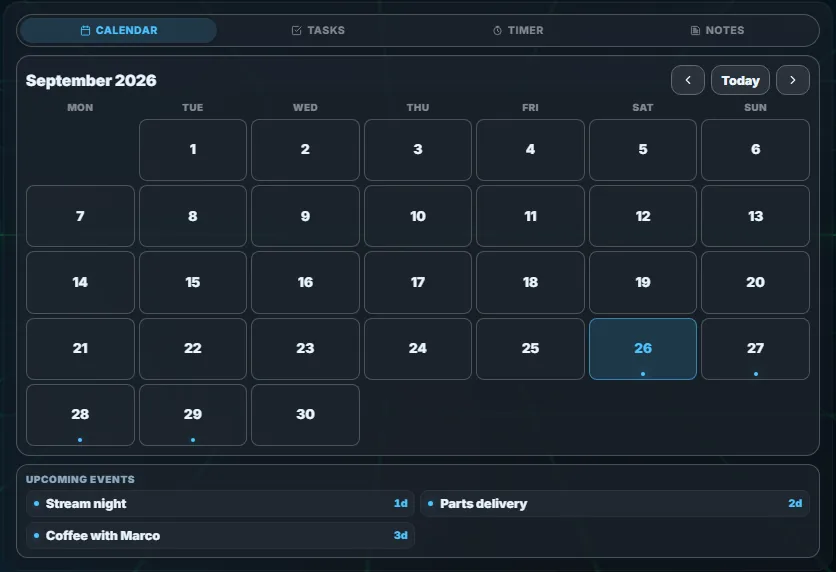
- Agenda. Calendar, Tasks, Timer and Notes as tabs of one tile; any of them you add as its own tile leaves the tab bar.
- Calendar. A month view with your own events and reminders, plus read-only events from Google, Outlook or any calendar that publishes an .ics link.
- Tasks. A to-do list with high, medium and low priority, and tasks that repeat every day, every week or every few days.
- Timer. Named countdowns and stopwatches, up to 20 at once, saved across restarts.
- Notes. Plain-text notes in tabs that save when you stop typing, with one you can pin to the front.
- Weather. Current conditions, the hourly and daily forecast and air quality, from Open-Meteo, MET Norway or wttr.in, with no account.
- Search. Finds files on the PC from a plain phrase such as “photos from December” or “big pdf”, typed right in the tile.
- File transfer. Sends photos, videos and files between a paired phone or tablet and the PC over your own network, and lists what arrived and what you sent. It needs phone access, which is in beta.
- Stocks. A watchlist of stocks, indices, crypto and currencies with the day's change and a chart per symbol, through Yahoo Finance with no key by default.
- Football. Fixtures, results and league tables for the clubs and competitions you follow, from TheSportsDB with no key.
- News. One list of headlines, newest first, from the outlets, topics and RSS feeds you follow.
- Notifications. The notifications your desktop shows, with the app, the sender and the text, which you can hide until you tap. Windows and Linux.
- Vitals. Pixel-art meters for drinking, eating, moving and resting your eyes that drain while you are at the PC. Tap one and confirm you did it to refill it.
- Phone. The contacts, call history, keypad and text messages of an iPhone or Android phone paired to the PC over Bluetooth. Windows, beta.
Media
5 widgets.
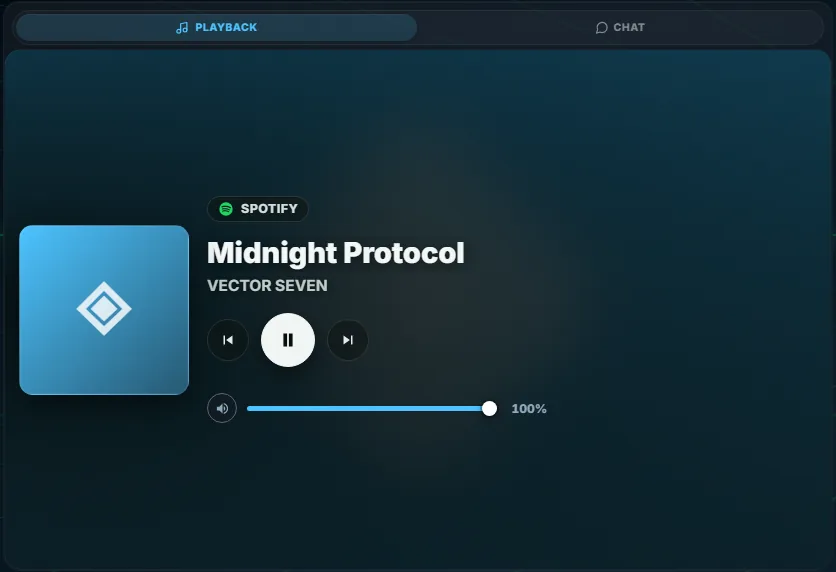
- Playback. What is playing in any media app on the PC, with the cover, play and pause, previous and next.
- Chat. Xenon AI's text chat, where you ask questions, attach images, PDFs and text files, and have it change things on the dashboard.
- Ask ChatGPT. A chat answered by your own ChatGPT plan through OpenAI Codex on the PC, with no API key. Conversations are kept on the PC, not in your ChatGPT history.
- Browser. A web page inside a tile, with tabs, an address bar and back and forward, run by a Chromium browser on the PC so it also opens sites that refuse to be embedded.
- Slideshow. Cycles through pictures and animated GIFs you add, or a folder on the PC, and a tap pauses it or steps through by hand.
System
15 widgets.
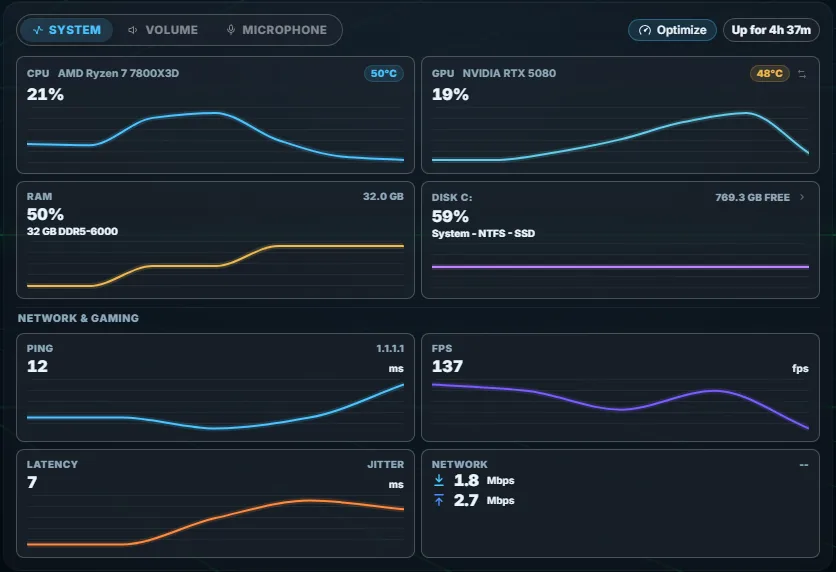
- System. Live graphs of CPU, GPU, memory and disk use, CPU and GPU temperatures, network speed, ping and the frame rate of the game you are playing. The in-game frame rate works on Windows, and on Linux for games started with MangoHud.
- Fans. The speed of every fan the sensors report, grouped by motherboard, hub or AIO, graphics card and power supply, with names you can change. Windows and Linux.
- Energy. The PC's power draw in watts for CPU and GPU, the whole machine when the power supply reports it, and Home Assistant power sensors beside them. The PC readings are Windows only; the Home Assistant ones work on every system.
- Batteries. The charge of wireless CORSAIR devices through iCUE, of Bluetooth devices, and of a laptop battery or a USB-connected UPS. Windows.
- Disk space. A map of what fills each drive, with the largest files, verified duplicates and a fixed list of safe-to-clean categories that go to the Recycle Bin or Trash.
- Developer cleanup. For supporters. Shows how much space Docker images and build cache, Ollama models, editor folders of deleted projects and the WSL and Docker virtual disks take, and frees it: Docker's own prune, model removal, folders to the Recycle Bin or Trash, and on Windows a Compact button for virtual disks of 10 GB or more.
- Volume. Master volume and mute, the output and input device, and a slider for each app playing sound. The per-app sliders work on Windows and Linux.
- Microphone. One large button mutes and unmutes the microphone, with a slider for its input sensitivity.
- Second screen. An extra Windows desktop made by a virtual display driver, shown live in the tile so you can drag apps onto it and use them by touch. Windows only.
- Remote Control. Status and controls for streaming the PC to your phone through Sunshine, Tailscale and Moonlight: pick which monitor to send, disconnect, block access, or unpair every device with the kill switch. It appears in the + palette once Sunshine and Tailscale are set up.
- Smart Home. The Home Assistant devices you pick, grouped by room: lights and switches as toggles, scenes as buttons, media players and sensor readings.
- Cameras. Near-live pictures from UniFi Protect cameras and from any camera Home Assistant exposes, with a tap to enlarge one.
- Lighting. Colour, effects and per-device mode for iCUE devices and for network lights such as WLED, Hue and Nanoleaf. iCUE devices on Windows only.
- Claude Code. Once you connect Claude Code from the tile: its 5-hour and weekly limits, each running session and what it is doing, and permission requests you can answer from the tile.
- Codex. For OpenAI Codex in the ChatGPT app, your editor or the terminal: the usage windows of your plan and your tokens per day, and once you connect Codex from the tile, each running session and the requests you can answer from the tile.
Streaming
10 widgets. Twitch, YouTube, Discord and Spotify connect to your own account in Settings, through a free developer app you register once. OBS, Streamer.bot and Wave Link need those programs running.
- Twitch Live. For streaming on Twitch: live status, go live or end through OBS, mic mute, clips, markers, ad breaks, the title and category, and the chat.
- Twitch. The Twitch player in a tile, with the live channels you follow, the top channels, search and an optional chat.
- YouTube. A YouTube player fed by your liked videos, playlists, subscriptions and search, where the rest of the list plays on as a queue.
- YouTube Live. For broadcasting on YouTube: create a live, go live or end it, read and write the chat, and watch viewers and stream health.
- OBS. A preview of what OBS is sending, go live and record buttons, a scene switcher, and a mute and volume slider for each audio input.
- Discord. The voice channel you are in and who is speaking, with mute, deafen, push-to-talk, a channel list to join, a soundboard, and your DMs and mentions.
- Spotify. A Spotify remote with the track playing, the queue, your playlists and your Spotify Connect devices; controlling playback needs Premium.
- Streamer.bot. A live feed of follows, subs, raids, cheers and redemptions from Streamer.bot, plus your Streamer.bot global variables.
- Wave Link. The Elgato Wave Link mixer: a fader and mute for each channel on each mix, with live level meters on Wave Link 3.
- Deck. A grid of programmable keys that open apps, send shortcuts, control media, OBS, Discord or Home Assistant, and run multi-step macros.
Grid, pages and tabs
Tap Layout in the top bar to edit the dashboard. Tiles sit on a grid of 24 columns with half-height rows, so they land close to where you drop them, and they resize from the corner.
The + on each page opens the Add widget panel: the four groups above, with the widgets you installed from the Store filed in the group that fits them, and a search. The Installed filter shows only the Store ones. A dashboard holds up to 8 pages, and you move between them by swiping, with the arrow keys or with the page dots in the top bar.
Drag one tile onto the middle of another and they become tabs of one tile; drag a tab out to split it again. The Media, Agenda and System tiles you start with are built this way.
Some widgets can be added more than once. A copy of Playback, Chat, Agenda, Calendar, Tasks, Timer, Notes, System, Volume or Microphone mirrors the original. A copy of Deck, Browser, Remote Control, Discord or a Store widget is independent, with its own content, such as a Deck's keys or a Browser's address.
A tile or a whole page can be saved as a preset and placed again in one tap, and a page can be shared with other people as a link or a file. On a phone the same dashboard restacks into one column; phone access is in beta.
Widgets from the catalog
The community catalog holds widgets, themes, animated backgrounds, pages, Deck profiles, Ambient scenes and full packages that other people made and shared. Every entry is moderated.
Copy an entry's code on the catalog page and paste it in Settings → Widgets & sharing → Import, or open the Store inside the app, which lists the same catalog. Before anything is applied, you see what the code contains.
Once installed, a catalog widget is in the + panel, in its group and under Installed. It runs sandboxed: it only gets the data, actions and web addresses it declared, and it asks for your permission first. The widget SDK behind it is in beta.
Making your own widget
Your own widget is built with the widget SDK, which is in beta: a folder with a manifest.json and an index.html. Xenon runs it in a sandbox and passes it live data and actions over one message bridge.
Settings → Widgets & sharing → Create links to the SDK guide. A widget you built can be shared with Export widget, and whoever imports it sees its permissions and approves them first.
The maker's guide starts from zero and covers themes, pages, Deck profiles and widgets. The Widget SDK reference has the full protocol.
Questions
How many widgets does Xenon have?
44 built-in widgets, in four groups: Productivity, Media, System and Streaming. Widgets from the community catalog and widgets you make sit next to them in the + panel.
Do the widgets need a Xeneon Edge?
No. The same dashboard runs on any monitor, a touchscreen, or, in beta, a phone or tablet on your Wi-Fi. See Xenon on the Xeneon Edge and a tablet or phone as a dashboard.
Can one tile hold several widgets?
Yes. In Layout mode, drag one tile onto the middle of another and they become tabs of the same tile. Drag a tab out to split it again.
How many pages can a dashboard have?
Up to 8, each on a 24-column grid. A new page starts empty and leaves the other pages as they are.
Can I make my own widget?
Yes. With the widget SDK, in beta, you write a widget as an HTML page and Xenon runs it inside a sandbox, with only the data and actions its user approves.
Download Xenon
Free for personal use, no account. Download Xenon for Windows, find the macOS and Linux builds on the download page, or try the dashboard first in the browser demo, which runs on simulated data.