Xenon next to other tools
Many people find Xenon while looking for desktop widgets, a sensor panel, an FPS counter, a screen recorder or a Stream Deck, and already use a tool for one of them. This page says what each tool does best, and when the other one is the better pick.
Last updated: 17 November 2026
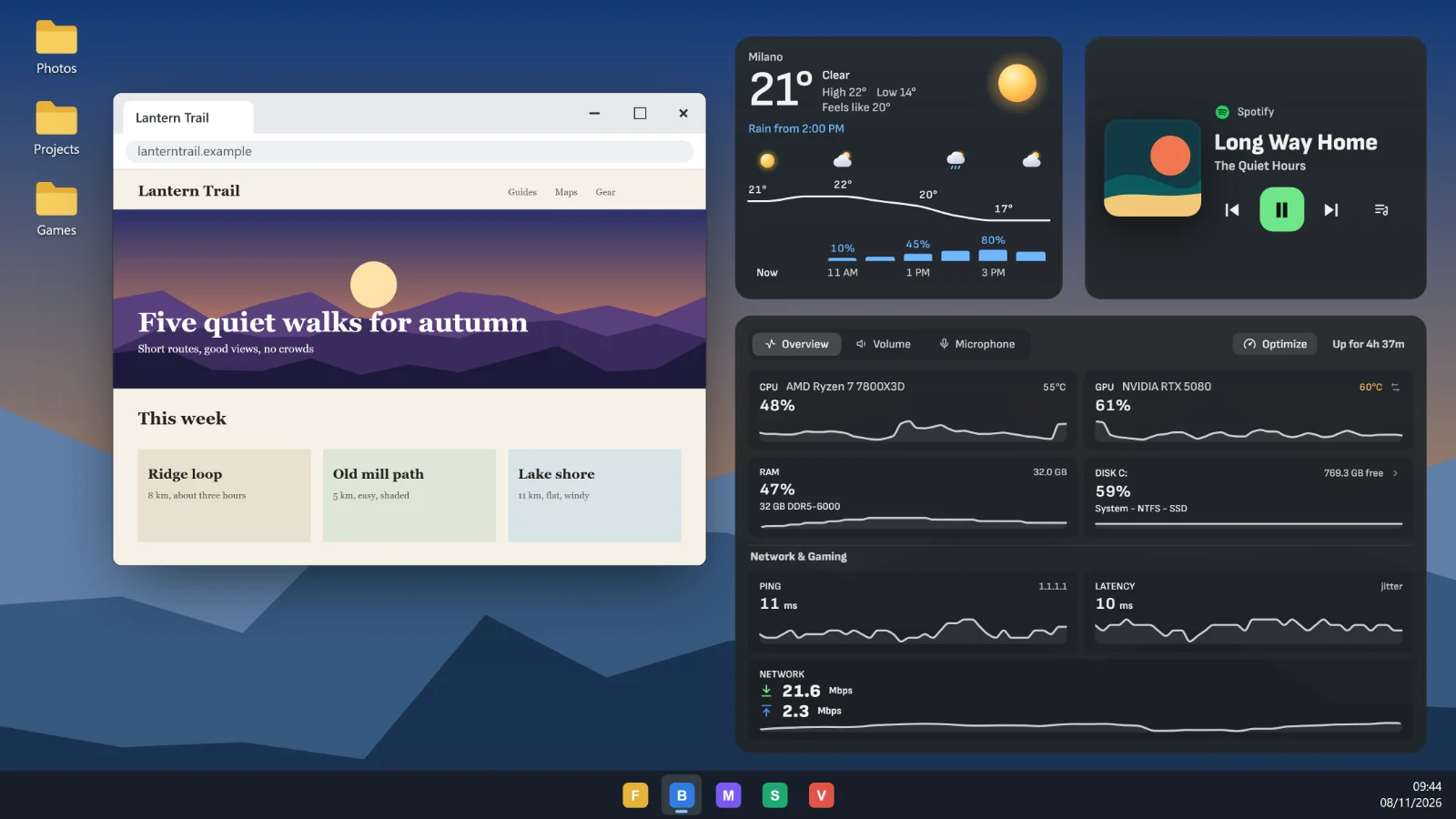
Widgets and sensors
| What | Xenon | Rainmeter | AIDA64 | Wallpaper Engine |
|---|---|---|---|---|
| Made for | Widgets on any screen: desktop, second monitor, tablet, phone | Skins on the desktop | System details, tests and sensor panels | Animated wallpapers |
| Price | Free | Free and open source | Paid licence | Paid once, on Steam |
| Systems | Windows; macOS and Linux in beta | Windows | Windows | Windows |
| Setting it up | Pick widgets from a menu, move them by hand | Install skins, change them in text files | Design the panel in its editor | Pick a wallpaper from the Workshop |
Rainmeter
Rainmeter is a free, open-source program that draws skins on the Windows desktop. It is light, it has years of community skins, and a skin can show almost anything if you are willing to edit its text files.
Xenon puts its widgets on the desktop too, and also on a second monitor, a touchscreen, a tablet or a phone, where you can tap them. You add and set up widgets from menus, and the same layout runs on macOS and Linux in beta.
Keep Rainmeter for a skin you already love on a Windows desktop. Try Xenon to put widgets on another screen, to touch them, or to skip the text files.
AIDA64 SensorPanel
AIDA64 is a paid suite for system details, diagnostics and benchmarks. Its SensorPanel draws your readings on a panel you design, it can drive many of the small USB screens sold for PC cases, and RemoteSensor shows readings in a phone browser.
Xenon is free, and its sensor panel is one widget among many: CPU, GPU, fans, power and the real frame rate in games, next to music, the calendar and Deck keys. It needs a screen that can show a web page, so it does not drive the small USB screens that only take a picture over a cable.
Keep AIDA64 for one of those small USB screens, or for its tests and diagnostics. Try Xenon if your panel is a spare monitor, a tablet or a phone. The sensor panel guide lists every reading.
Wallpaper Engine
Wallpaper Engine is a low-cost Steam app for animated wallpapers, with a huge Workshop of scenes and a free Android app that takes them to a phone.
Xenon has animated backgrounds and Ambient scenes too, but its job is widgets: readings, music, the calendar, Deck keys and the assistant. The two can run on the same PC.
Keep Wallpaper Engine for the wallpaper itself. Add Xenon for what goes on top of it, or on another screen.
Games and recording
| What | Xenon | Afterburner | NVIDIA App | Game Bar | OBS Studio |
|---|---|---|---|---|---|
| Made for | FPS, lows and frame time on any screen, plus recording and Instant Replay | Overclocking and an in-game overlay | Recording, Instant Replay and an overlay on NVIDIA cards | Captures and a performance widget built into Windows | Live streaming and recording with scenes |
| Price | Free | Free | Free | Free, part of Windows | Free and open source |
| Systems | Windows; macOS and Linux in beta | Windows | Windows, NVIDIA cards only | Windows | Windows, macOS, Linux |
| Setting it up | Add a widget, save replays with a key or a tap | Set up the overlay in RivaTuner | Press Alt+Z in a game | Press Win+G in a game | Build scenes and sources, then set the output |
MSI Afterburner
MSI Afterburner, with RivaTuner, is the free classic for overclocking, fan curves and an FPS overlay drawn from inside the game, which is how it can show over exclusive full screen.
Xenon stays outside the game. It shows the frame rate, 1% and 0.1% lows and frame time on a second screen, a phone or a window over the game, compares past games, and names a likely cause when a game stutters. It does not overclock, undervolt or set fan curves.
Keep Afterburner for overclocking and fan curves. Add Xenon to read the numbers on another screen and keep a history of your games. The FPS overlay guide has the details.
NVIDIA App
The NVIDIA App is the free companion for GeForce cards. Its overlay records games, keeps an Instant Replay, takes screenshots and shows FPS and other statistics over the game, using the encoder on the graphics card. AMD Software does much the same on Radeon cards.
Xenon records with the capture and video encoders built into the system, so it works with any graphics card. Its Instant Replay keeps from 15 seconds to 60 minutes on the disk, saves clips around the moments you mark, and puts everything in one gallery where trimming takes a second. The stats can sit on another screen instead of over the game.
Keep the NVIDIA App for driver updates and game settings. Try Xenon for replays on any graphics card, one gallery for clips and screenshots, and stats on a second screen. The screen recorder guide has the details.
Xbox Game Bar
Xbox Game Bar comes with Windows. Press Win+G in a game to record, save the last moments, take a screenshot or open small widgets, one of them for performance.
Xenon does these jobs without covering the game: its widgets live on a second screen, a phone or the desktop, and you save a replay with a shortcut, a Deck tap or by asking Bit. It adds a clip gallery, marks, a history of your games and FPS lows over time.
Keep Game Bar if a quick capture now and then is all you need. Try Xenon to have the stats and controls on another screen, or a history of your games.
OBS Studio
OBS Studio is the free, open-source standard for live streaming and for recording with scenes: cameras, overlays, many sources and an audio mixer, on Windows, macOS and Linux.
Xenon does not stream. It records the screen or one window, with the microphone on its own track, keeps an Instant Replay and saves screenshots, with nothing to set up first. Its Deck keys also drive OBS: switch scenes, start and stop the stream or the recording, mute a source.
Keep OBS for streaming and for recordings built from scenes. Add Xenon for quick recordings and replays, and to control OBS from a touchscreen or a phone. The Deck guide lists the OBS keys.
Deck keys
| What | Xenon | Stream Deck | Touch Portal |
|---|---|---|---|
| Made for | Touch keys on a screen you already own, next to your widgets | A desk device with screen keys, and a phone app | Macro buttons on a phone or tablet |
| Price | Free | Device bought once; phone app free with 6 keys, more with Pro | Free; plug-ins need the paid Pro |
| Systems | Windows; macOS and Linux in beta | Windows, macOS | Windows, macOS |
| Setting it up | Pick actions in the key editor | Drag actions onto keys in its app | Build pages of buttons in its editor |
Stream Deck
Stream Deck by Elgato is a family of desk devices whose keys are small screens, with a large library of plug-ins. The Stream Deck Mobile app turns a phone into keys too: six for free, more with a Pro subscription.
The Xenon Deck is a grid of touch keys on a screen you already own, such as a touchscreen, a spare monitor, a tablet or a phone, next to your other widgets. Keys open apps, send shortcuts, switch OBS scenes, mute Discord, run macros and show the state of what they control. It is free.
Keep a Stream Deck for physical keys you can press without looking. Try the Xenon Deck on a screen you already have, at no cost. The Deck guide shows every kind of key.
Touch Portal
Touch Portal turns a phone or tablet into pages of macro buttons for a Windows or Mac computer. The free version covers the basics, and plug-ins need the paid Pro version.
The Xenon Deck runs on a phone or tablet too, in its browser with nothing to install (beta), and the same keys work on the desktop or a touchscreen. Beside the keys, the same screen can show your sensors, music and calendar.
Keep Touch Portal if you rely on one of its plug-ins. Try Xenon for keys and widgets together, for free.
Using them together
Xenon does not ask you to remove anything. It reads the sensors itself, so it needs neither AIDA64 nor HWiNFO, and it runs beside Afterburner, Rainmeter, Wallpaper Engine, OBS or the NVIDIA App.
Keep the tools you like, and let Xenon take the screens they do not reach: a spare monitor, an old tablet, your phone or a touchscreen next to the keyboard.
Questions
Is Xenon a Rainmeter alternative?
For widgets, yes. It shows system readings, music, weather, a calendar and more on the desktop, and also on a second screen, a tablet or a phone. It does not load Rainmeter skins.
Is the Xenon Deck a Stream Deck alternative?
Yes, on a screen you already own: a touchscreen, a spare monitor, a tablet or a phone. Keys open apps, send shortcuts, switch OBS scenes and run macros. It has no physical keys.
Can Xenon replace OBS?
For recording and Instant Replay, yes. For live streaming, no: Xenon does not stream, but its Deck keys can switch OBS scenes and start or stop the stream.
Is Xenon free?
Yes. Xenon is free for personal use and needs no account. Supporters pay for extras such as monthly drops, but everything this page compares is in the free app.
Can Xenon show PC sensors on a phone?
Yes, in beta. Pair the phone with the PC over your own Wi-Fi and it shows the dashboard in its browser, sensors included. There is nothing to install on the phone.
Does Xenon work with small USB sensor screens?
Not with the ones that only take a picture over a USB cable. Xenon needs a screen that shows a web page: a monitor, a touchscreen such as the CORSAIR Xeneon Edge, a tablet or a phone.
Download Xenon
Xenon is free and needs no account. Download Xenon for Windows, or pick macOS or Linux (beta) on the download page.
To look around first, open the browser demo. It runs with sample readings, because there is no PC behind the page.