Screen recorder and Instant Replay
Xenon records your screen or one window, keeps the last minutes with Instant Replay, takes screenshots and reads text off the screen. Everything is saved on your PC, nothing is uploaded, and there is no account. Free on Windows; on macOS and Linux as a beta.
Last updated: 31 October 2026
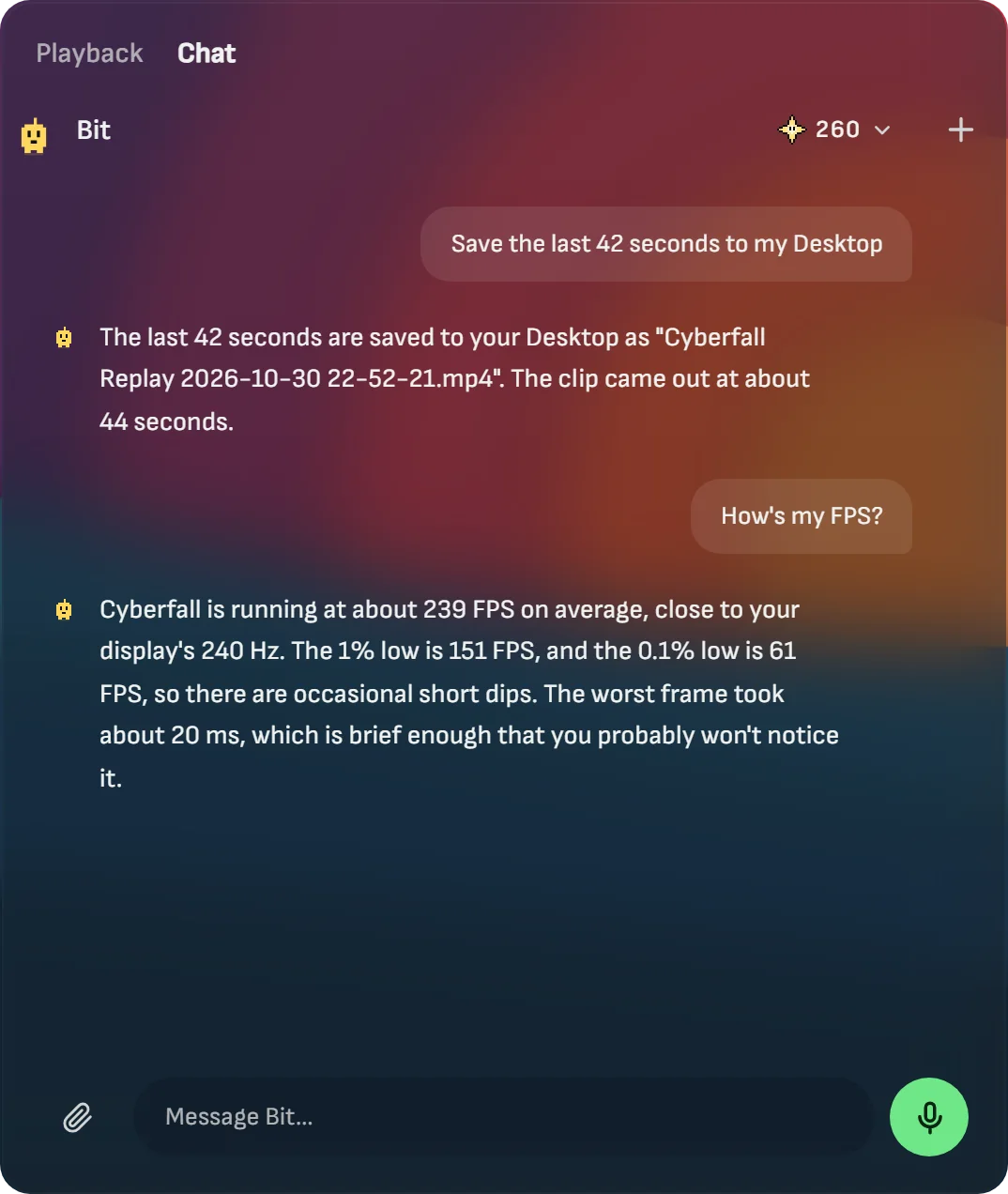
Instant Replay: save what just happened
Turn on Instant Replay in Settings, Capture, and Xenon keeps the last minutes of your screen. When something happens that you did not plan to record, press Ctrl+Shift+F10 in any app, tap the Instant Replay key on the Deck, or say “save the last 30 seconds” to Bit. The clip is saved as an MP4 in about a second.
Choose how much it keeps, from 15 seconds to 60 minutes. The page shows how much disk space that takes. The kept minutes wait on the disk, not in memory, and are replaced as new ones arrive. By default it runs only while a game is open; choose Always to keep the desktop too.
It is off until you turn it on, because while it is on it records all the time. The microphone is never recorded unless you choose it.
Mark a moment while the replay runs and Xenon saves a clip around it by itself: 15 seconds before the mark to 5 after. On Windows it can also mark the spots where a game suddenly drops frames, so the stutter is easy to find.
Record the screen, a window or a timelapse
The Record video key records the whole monitor you are working on or only the window in front, as an MP4 in Videos, Xenon, in a folder named after the game. Recording a window keeps only the sound of that app, with no notifications or music from other apps. Recording the screen keeps everything the PC plays, and your microphone can be added on its own track.
A small pill with the time sits at the top of the screen and never appears in your videos. If Xenon closes or crashes, the part already recorded is kept and plays. In Settings, Capture you choose 60 or 30 frames per second, the size, the quality, the folder and a space limit from 10 to 100 GB.
Add your webcam as a round bubble in a corner of the video. For long work, Timelapse takes one picture every 1 to 60 seconds and plays them back at 30 frames per second.
Screenshots, pinned pictures and screen tools
Take a screenshot of the screen, of the window in front, or of an area you drag over a frozen screen. It is saved as a PNG in Pictures, Xenon and copied, ready to paste. On an HDR screen the picture keeps the colours you see.
Pin a screenshot on top of your windows to copy from it, edit a screenshot to cover private data before you share it, or draw on the screen during a call. The colour picker and the ruler work on a frozen screen too.
Copy text from the screen
Drag over the words in a scanned PDF, a picture, a video or an app that does not let you select, and Xenon puts the text on the clipboard. On Windows it uses the text recognition built into Windows, in the languages you have installed. You can also ask Bit “what does this error say?”.
A gallery that trims, shares and transcribes
Every screenshot, recording and replay goes into one gallery, grouped by day and game. Trim a video by dragging two handles: the copy is saved in about a second because nothing is encoded again, and the original stays.
Make a 9:16 copy for phones, a lighter copy of 10, 25, 50 or 100 MB for chats, or a GIF. Get a transcript and .srt subtitles made on your PC with Whisper, for videos up to two hours. Send a capture to your paired phone over your own Wi-Fi, or open the gallery from the phone to watch and download.
On a Mac and on Linux
| System | Screenshots and recording | Instant Replay |
|---|---|---|
| Windows | Screen, window and area | Yes |
| macOS (Beta) | Screen, window and area; the computer’s sound on macOS 13 or later | macOS 12.3 or later |
| Linux X11 (Beta) | Screen, window and area, with maim, xdotool and ffmpeg | With ffmpeg |
| Sway, Hyprland (Beta) | Screen and area, with grim, slurp and wf-recorder | With ffmpeg |
| KDE, GNOME on Wayland (Beta) | Screenshots; screen recording with ffmpeg and GStreamer PipeWire | No |
The first time on a Mac, macOS asks you to allow Screen Recording for Xenon. On Linux what you get depends on your desktop and the tools installed, and Settings, Capture says what is missing. Neither has been tried on a real Mac or a real Linux PC yet.
What it does not do
Xenon does not upload your captures anywhere and has no cloud library. It does not inject code into games: it records with the capture and video encoders built into the system, not with NVIDIA, AMD or Intel software.
Common questions
Does Instant Replay need an NVIDIA or AMD card?
No. On Windows and macOS Xenon records with the capture and video encoders built into the system, not with the graphics card maker’s software.
Does Xenon record my microphone?
Only if you choose it. Recordings and Instant Replay record the PC sound by default, and the microphone is off until you pick it in the key or in Settings, Capture.
Where are my recordings saved?
Videos go to Videos, Xenon and screenshots to Pictures, Xenon, each in a folder named after the game. You can pick another folder in Settings, Capture.
Is the screen recorder free?
Yes. Recording, Instant Replay, screenshots, the gallery and the transcripts are part of the free app, with no account and no watermark.
Download Xenon
Free, with no account. Download Xenon for Windows, or pick your system on the download page. For the FPS counter over your game, read FPS overlay with 1% and 0.1% lows.