TGK Battery Level
Widget for Xenon, by The.GothamKnight
Free. Copy the share code, then paste it into Xenon under Create and share → Import. Everything stays on your machine.
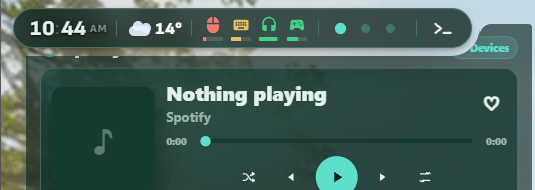
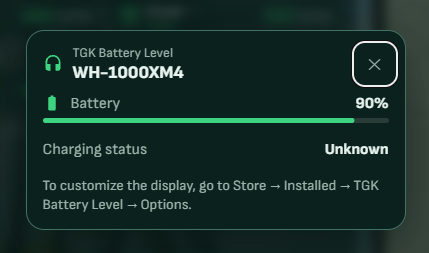
Monitor mouse, keyboard, headset and controller battery levels directly in Xenon's top bar. Features live updates, charging status, customizable indicators, automatic theme colors and 3 sizes available.
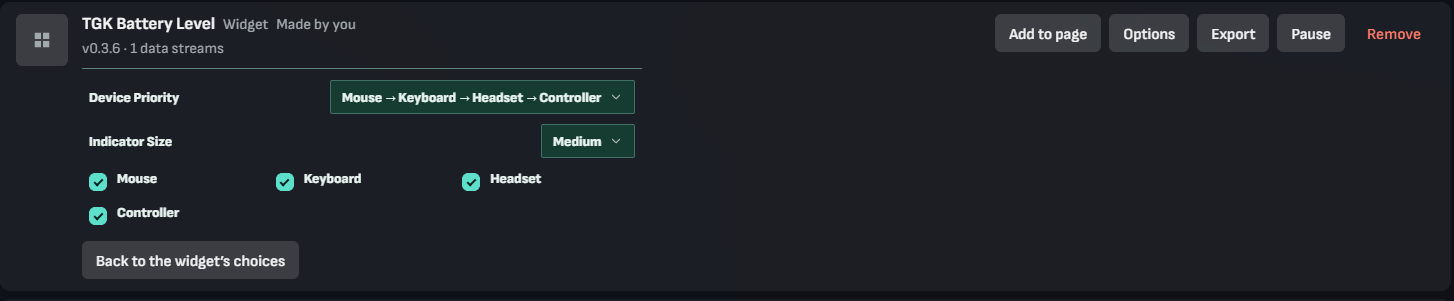
Options are in Store -> Installed -> TGK Battery Level -> Options
What a widget does
A widget is a tile you place where you want it in Xenon. It runs sandboxed, with no network access unless its manifest asks for named hosts and you approve them at install.
Palette
#1ed760#0b0d12#e9edf6
How to install it
- Open TGK Battery Level in the catalog and press Copy code.
- In Xenon, open Create and share → Import and paste the code.
- Xenon shows you what the code contains before anything is applied. Confirm, and TGK Battery Level is in Xenon.
- This one needs Xenon 5.2.0 or later. An older install refuses the code rather than importing half of it.